
With a radio, we can very slowly scroll our VFO and listen for activity. It’s fun, it’s exciting, but it’s not super efficient when the objective is to rack up a mass of contacts. No matter how slowly we roll the knob, we still miss things. Operators pause between transmissions; they’re there, then they’re gone – then they’re back. QSB on the band, fading, does the same thing. Operators fade in and out of our rig’s sensitivity and our audible range. In the last 20’s, operators used spark gap transmitters, in these 20’s, things have changed.
POTA is a game of making contacts and they have a spot page. It allows park activators to declare, spot, their park, frequency and mode for all the Internet to see. This is how hunters find activators and regardless of whether it’s cheating in the eyes of typical contesters, it’s how POTA is played.
In the end, there’s two ways an activator is spotted: 1. The activator spots himself. 2. Some kind operator happens across us “calling in the blind” and spots for us.
Now, before I go any further, we can activate without a spot. Folks see your signal on their waterfall and tune in to hear what’s happening. We’ve all done it, it happens. But, it’s tough and for a QRP activator, it can be pretty lonely. When all else fail, just call and keep calling. Someone will come along.
From what I know, there’s four basic ways for an activator to spot. I’ve tried them and they work.
- Spot Page
- Planning Your Activation
- SMS Text
- SotaMat
Also facilitates sending preset text messages
Spot Page
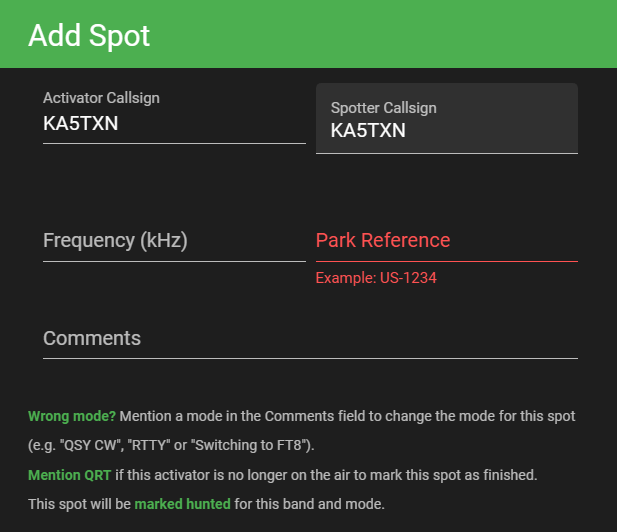
It’s the reliable method we use most often. Settle on a band and a quiet frequency, whip out your phone, open the spot page on pota.app, and select Add Spot. Eazy Peezy. It’s works perfectly until cell coverage fails or is so thin you can’t load an internet page.
Planning an Activation
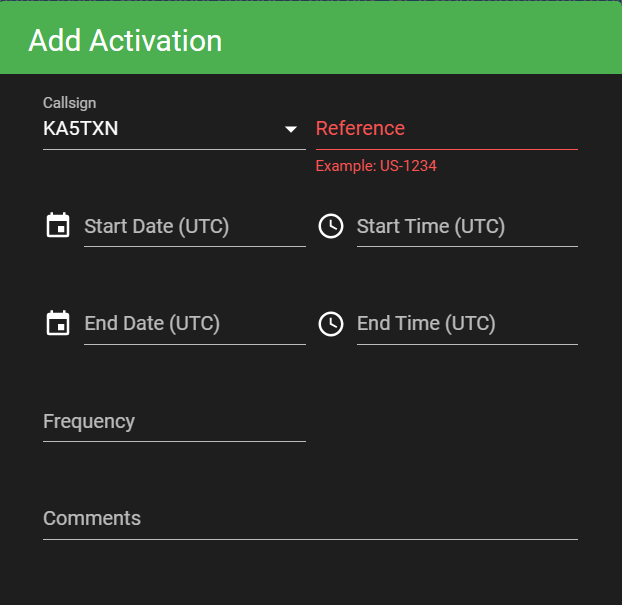
Planning….. My Dad taught me the 6-P’s, Prior Planning Prevents Piss Poor Performance. In this context we call it Scheduling an Activation. From the pota.app page, select Add Activation. Note: The dates and times are in UTC and if you’re in the US, it ain’t the same date and time showing on your iPhone. When you’re planning activations for multiple parks, it can get tricky, and you and the system can sometimes confuse which park you’re in.
With a scheduled activation, skimmers (a network of listening stations) report to the RBN, Reverse Beacon Network, where the POTA system monitors. The POTA system connects the RBN data to their scheduled activation and spots what’s scheduled. Yeah – I probably have the technical mumbo jumbo wrong, so call it magic. It works.
SMS Spotting
When cell coverage it thin, there might be just enough connectivity to get a text message out. I’ve frequented a park on the Blue River in Southern Oklahoma where that one bar of cell coverage is just so, might get a text out but the coverage too thin for a web page. SMS Spotting to the rescue.
APSPOT
“APSPOT stands for APRS SPOT
APSPOT is a new APRS system designed to provide a one-stop shop for self spotting activations via APRS, to the myriad of activity based spotting systems out there.”
… and it works. Text your callsign, program, park, frequency, and mode to 1-866-870-5797 and it will spot you. Understand, there’s a system parsing the characters in your text so you must follow the format below, exactly. Of course, substitute the pertinent information with your particulars.
!MY5CALL POTA US-1234 14.060 CW COMMENT
See https://apspot.radio for more details.
SOTAmat
It’s pronounced “mate” but I don’t care.
In my summary, SOTAmat is a phone app that makes your phone scream pre-recorded park information in digital-FT8. With your rig in sideband, tune to the FT8 frequency, 14.074 works, key the mike and push the button on the app. The phone makes FT8 sounds and your rig transmits it into the FT8 swirl. This works reliably. No cell service.
You have to get the SotaMat app and the initial setup is tedious. This video is really helpful SOTAmat Getting Started: self spotting SOTA and POTA off-grid using HF (no internet / no cell)

Note: SOTAmat will send preset text messages the same way. I’ve set my app up to send an “I’m here safely” message to my wife’s phone. I also have one set to send, “Checking in, everything is fine.”
TNX ES 73
KA5TXN
DitWit

 DitWit Portable Radio
Leave a comment